House blog
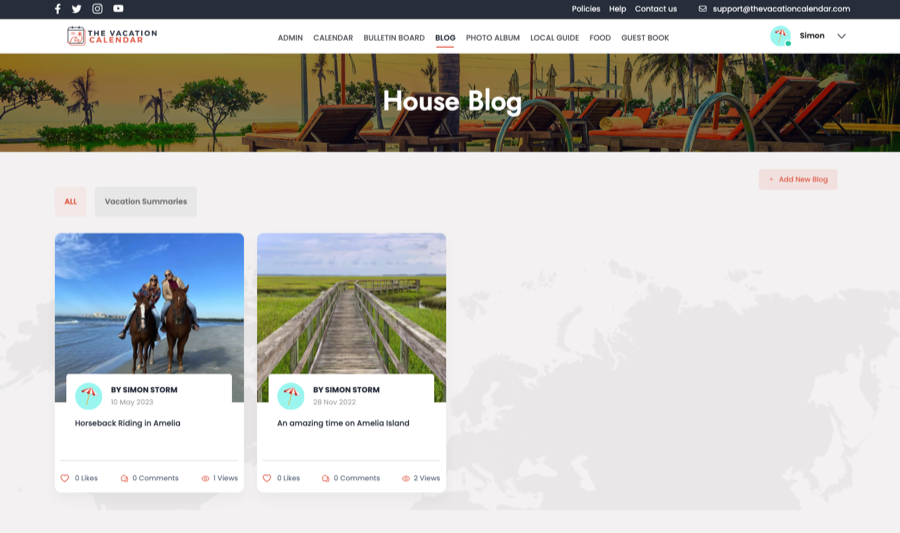
Trip recaps, recipes and house news, written in a rich-text editor and emailed in full to everyone on the Blog distribution list.
Older videos say "Owner" where the site now says "Scheduler". Same role, new name.
What to write
The blog is the house talking to the family. Unlike the bulletin board, which sits quietly waiting to be read, a blog post is emailed in full to everyone on the blog list. People who never log in still get the story, photo and all, in their inbox.
Which makes it the right place for anything the family would genuinely like to hear about:
- Trip recaps. Four paragraphs and a photo about the week you just had. These are the posts people read twice.
- House news. The new roof, the tree that came down in the storm, the dock repair and what it cost.
- Recipes and traditions. Grandma's chowder, the rules of the annual card game, how the turkey gets cooked.
- Seasonal notes. Opening weekend, closing weekend, the state of the garden.
- Small requests. The blender died, the paddle is missing, does anyone know where the good corkscrew went.
Administrators and Schedulers write posts. Everyone logged in, Guests included, can read them, like them and leave comments. You do not need to be a writer. Two paragraphs and a photograph beat a blank page every single time.
Set up categories first
Before the first post, go to Admin → Settings → Categories, set Select Type to Blog and add a few categories. Vacation Summaries, House News, Recipes and Projects cover most houses.
Categories turn into the filter tabs along the top of the blog, so someone hunting for the chowder recipe in November does not have to scroll through four years of trip recaps. It takes a minute now and cannot be done retrospectively without editing every post. More on the categories screen in House settings.
Writing a post
- Open Blog from the top menu and press Add New Blog.
- Fill in the Subject. This is the headline on the card and the subject line people see in their inbox, so make it the actual news: "The dock is back in" rather than "Update".
- Choose a Category.
- Write the Content in the rich text editor. Headings, bold, lists and links are all available, and the ellipsis at the end of the toolbar reveals the rest of the formatting.
- Add an image. It becomes the card's picture on the blog page and it is what makes people open the email.
- Press Add Blog Item.
The moment you save, a New Blog entry added to <House> email goes to everyone on the New blog items distribution list with the whole post inside it. There is no draft stage, so write it, read it once, then publish. Who is on that list is up to an Administrator: see Notifications & emails.
Keep the post itself to the story and put the twenty photographs in a photo album, then link to the album from the post. The email stays a pleasant read and the pictures stay where people can find them next year.
Comments and likes
Open a post and there is a heart and a comment box at the bottom. Anyone logged in to the house can use both, Guests included, which is how a trip recap turns into the thread where three people admit they also lost sunglasses in the lake.
Comments do not send email to anyone. That is on purpose, so a lively post does not fill forty inboxes, but it does mean you have to look in to see replies. If a comment deserves an answer that everyone should see, it is often worth its own short post.
Likes are simply a count on the card. They are the low-effort way for the cousin who would never comment to say she read it and enjoyed it, which is worth more than it sounds.
Editing and deleting
Open the post and edit it. Who may do what is the usual arrangement:
- Schedulers edit and delete their own posts.
- Administrators edit and delete anybody's post, and can remove any comment.
Two things to remember before you edit. Correcting a typo does not send a second email, so fix away. And the email that already went out is a copy, frozen at the moment you published, which is why it pays to reread a post before pressing the button rather than after.
Deleting a post takes its comments and likes with it, permanently. For a post that has simply aged, leaving it alone is kinder; old trip recaps are the best thing on the site five years later.
Administrators can delete any comment, which is very rarely needed in a family house but good to know about. The person who wrote it is not told.
Common questions
Related topics
Still stuck?
Send us a note with your house name and a real person will answer. Short video walkthroughs are on our YouTube playlist.


