DocumentsNEW
Store up to 30 house documents such as insurance, manuals and the septic map, viewable in the browser by the people you choose.
What to store
Somewhere in a drawer at the house, or in one person's email from 2021, is the paperwork everybody needs and nobody can find. The insurance policy. The septic map the plumber asks for every single time. The manual for the heat pump with the error codes in the back.
Documents is the shelf for all of it: up to thirty files kept with the house, searchable, and readable in the browser by whichever people you choose. No attachments, no "can you forward me that again", no one person being the only one who has it.
What houses usually put there:
- Insurance — the policy, the schedule, the claim number to call.
- Appliance manuals — furnace, heat pump, hot tub, generator, the mower with the impossible starting procedure.
- The septic map and the well report, plus anything else nobody can guess at when it goes wrong.
- HOA rules and the association's contact sheet.
- Service contracts — the cleaner, the pool company, the plowing arrangement.
- Checklists — opening the house, closing the house, the storm routine.
- The property tax bill and recent statements, if the family shares the running costs.
Short instructions read better on the bulletin board, where nobody has to open anything. Documents is for the real files: the ten-page policy, the scanned map, the manual nobody wants to retype.
File types and limits
| How many | 30 documents per house |
|---|---|
| How big | 10 MB per file |
| What kind | PDF, TXT, DOC and DOCX, XLS, XLSX and CSV, PPT and PPTX |
Word, Excel and PowerPoint files are converted to PDF so that they open in the browser on any device without anyone needing the matching software. The conversion happens after the upload and takes a moment, so if a file is not ready the instant you add it, give it a few seconds and refresh.
Thirty files sounds tight until you try to fill it. It is a deliberate limit that keeps this a shelf of important paperwork rather than a filing cabinet. If you are bumping into it, the usual culprit is receipts, which belong with the expense they relate to in Financials instead.
Documents can be seen by more people than you might assume, and your house shares one Guest password. Bank details, account numbers, passwords and anything with a signature on it should stay off the site.
Uploading and organizing
Only Administrators upload documents.
- Go to Admin → Documents.
- Press Upload Document.
- Press Choose File and pick the file from your computer.
- Fill in the Display Name. This is what everyone sees, so use plain words: "Hot Tub Manual" rather than "scan_0043_final_v2".
- Save, and give an Office file a moment to finish converting.
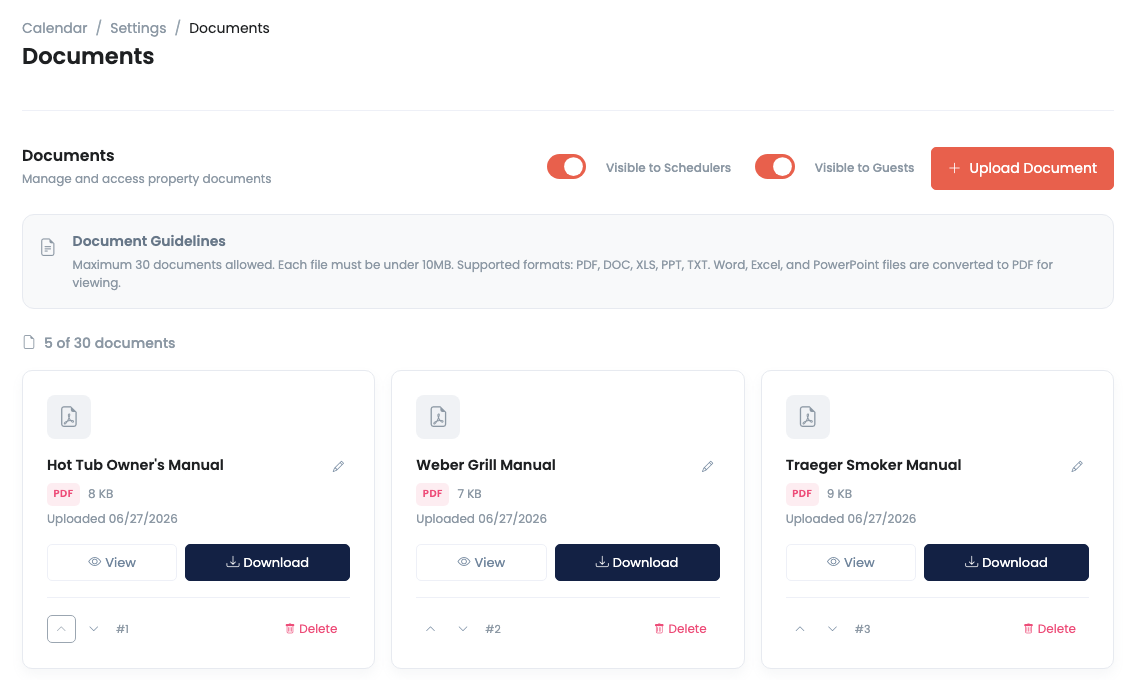
After that the same screen is where you tidy up. Rename a document whenever a better name occurs to you, move documents up and down with the arrows to set the order they appear in, and delete the ones that have been superseded. Order matters more than it sounds: the three files people need in an emergency should be at the top, and last year's expired policy should not be there at all.
Put the year in the name of anything that is reissued each year, such as "Insurance Policy 2026". It makes the out-of-date ones obvious at a glance when you next tidy up.
Viewing and downloading
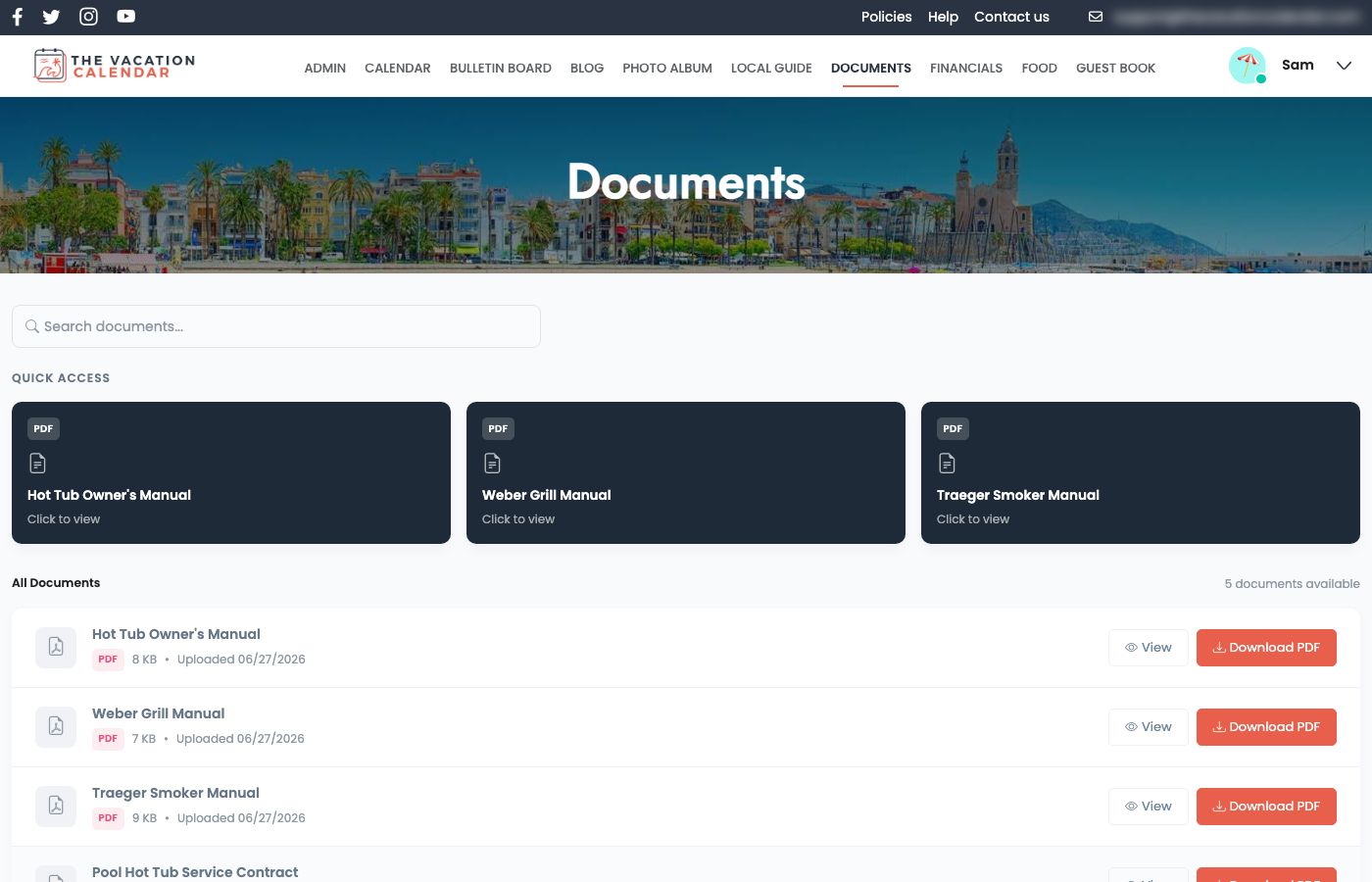
Everyone else opens DOCUMENTS in the top menu. There is a search box at the top: type part of a name and the list narrows as you go, which is faster than reading thirty rows when you are standing in the basement with a flashlight.
Each document can be opened in the browser or downloaded as a PDF. Viewing in the browser is the quick way to check one thing, such as the model number or the policy number. Downloading is what you want when you are about to email the plumber, or when the house has the sort of internet connection that comes and goes.
Nothing here is editable. A document is a copy of the file as it was uploaded, so to change one an Administrator uploads the new version and deletes the old one. That is a feature rather than a shortcoming: the septic map should not be something anyone can accidentally redraw.
Who can see documents
Each document has two switches on the Administrator's screen, and they decide who else can see it:
| Switch | Default | What it means |
|---|---|---|
| Visible to Schedulers | On | The family members who book vacations can open the document. |
| Visible to Guests | Off | Anyone logged in with the shared Guest password can open it. |
Administrators always see everything. The defaults are the sensible starting point: the family can read the manuals and the paperwork, while a guest staying for a weekend cannot.
Switch Visible to Guests on for the handful of files that genuinely help a visitor, such as the grill instructions, the hot tub manual or the beach parking permit. Leave it off for anything financial or contractual. And if your house rents to strangers, remember that the Guest password gets passed around: see Users & guest access for how that works and how to change it.
Common questions
Related topics
Still stuck?
Send us a note with your house name and a real person will answer. Short video walkthroughs are on our YouTube playlist.


